Reducing Disk Size

MarkG13

Bit poster
Hello,

I'm running parallels 12 and my HD space for my widnows machine was 120gb, i barely used any of this so wanted to reduce this to about 80gb.

I shut down the machine then went to settings > hardware > harddrive > edit and reduce the drive to 86gb. The disk was resized but i never saw the increase on my mac for the other 40gb i expected to free up.

Have i done something wrong?

Thanks!
 
Hi MarkG13,
Parallels Desktop virtual machine will be created with an expanding disk by default not as a plain disk. If plain disk is created then only the allocated space will be occupied on the Mac else the space used will be occupied. As your virtual hard disk is created as expanding hard disk and the space used is less than 80 GB reducing the limit will not result with any changes.
 
I have parallel desktops 13 and by the first installation I give 400 gb. Too much, I know that now. But how can I reduce the size now? I have not choose expandebal drive and if I reduce size, it works for 2 sec., but nothing happens. I need help!!!!

If I delete the vm and parallels, do I get the space back for the Mac partition? I could reinstall parallel desktops again and choose a smaller size. Is this possible???
 
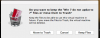
Yes Thomas If you delete the vm you can get the hard drive space back, With vm selected (But not on) go to file> remove>
you are going to select Move to Trash
Screen Shot 2017-12-23 at 10.26.17 AM.png
you don't need to remove Parallels itself in-order to reclaim your disk space.
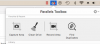
What I do next is use Parallels Tool Box and the clean drive .
Screen Shot 2017-12-23 at 10.29.33 AM.png
 
I have parallel desktops 13 and by the first installation I give 400 gb. Too much, I know that now. But how can I reduce the size now? I have not choose expandebal drive and if I reduce size, it works for 2 sec., but nothing happens. I need help!!!!

If I delete the vm and parallels, do I get the space back for the Mac partition? I could reinstall parallel desktops again and choose a smaller size. Is this possible???
Yes, you can delete the virtual machine and get free space on your Mac. Refer to article for steps.
 
Back
Top