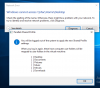
After a big Win10 update I get dialogs that Windows can't connect to my local mac folders (desktop, Documents etc)
If I press OK on the Paralles Shared profile (see screenshot) dialog it logs out but when I log in the problem remains.
I also tried it when the Firewall is fully off but that also doesn't help.
Can someone help me?
Thanks!
If I press OK on the Paralles Shared profile (see screenshot) dialog it logs out but when I log in the problem remains.
I also tried it when the Firewall is fully off but that also doesn't help.
Can someone help me?
Thanks!