
MuhsinFatih
Bit poster
First things first, in this thread I will swap cmd and option BUT this solution is for every possible key you can have on your keyboard (including the FN key!) so don't rage quit before reading 
Long explanation: Ok so it took me 2 days to swap cmd and option (or windows and alt) keys for my Windows10 VM for real so I wanted to share my solution for those who experience the same inconvenience. Btw I say for real because there are many "solutions" out there that either require remapping for every singe possible combination of shortcuts, which is completely frustrating and actually impossible since there are all kinds of applications that define their own shortcuts, or there's the swapping them in MacOS's setting which is confusing as hell when you switch back to MacOS. Remapping cmd to alt keys within Parallel's shortcut options is NOT a solution because when you try swapping keys in parallel's settings, you will see that there is no rightOption or rightAlt or AltGr as the input key, there is the alt key so you wouldn't be able to type special characters so parallels options out. I wanted an elegant solution that would work just like on a real Windows machine, no manual shortcut definitions no nothing else. And I found one:
Solution: We will use Karabiner to define key mappings for the parallels desktop only, believe me it's only going to take you 2 minutes and save the rest of the day.
1:
First disable whatever shortcut there is in parallel's shortcut options, we don't want shortcuts adopted from OSX, we want the actual Windows layout:
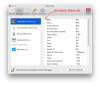
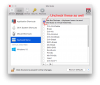
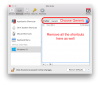
2:
Send all shortcuts to VM to make sure nothing interferes with VM: Set "send OS X system shortcuts" to "always"
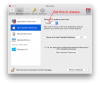
3:
Download and install karabiner: https://pqrs.org/osx/karabiner/
Go to karabiner's preferences:
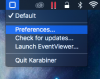
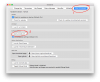
Go to misc&install and go to your private.xml 's location and open the file with whichever app you like:
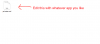
Swap the keys:
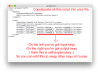
Here's the script:
4:
Go to "change key" section in karabiner's options. Reload xml and enable the swapping we just defined:
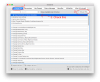
5: Go to your virtual machine and enjoy!
Note that after these steps, there will be no macos friendly shortcuts in your virtual machine, there will be the windows as you would expect it to be -which is awesome!-.
If you are having issues with modifier keys by the way, I suggest you enabling the "optimize for games" option for keyboard. It will improve the modifier keys' responsiveness.
For further information about editing private.xml go here: https://pqrs.org/osx/karabiner/xml.html.en
A couple useful keycodes to give you some idea:
Hope this helped you. Happy VM'ings! 
Long explanation: Ok so it took me 2 days to swap cmd and option (or windows and alt) keys for my Windows10 VM for real so I wanted to share my solution for those who experience the same inconvenience. Btw I say for real because there are many "solutions" out there that either require remapping for every singe possible combination of shortcuts, which is completely frustrating and actually impossible since there are all kinds of applications that define their own shortcuts, or there's the swapping them in MacOS's setting which is confusing as hell when you switch back to MacOS. Remapping cmd to alt keys within Parallel's shortcut options is NOT a solution because when you try swapping keys in parallel's settings, you will see that there is no rightOption or rightAlt or AltGr as the input key, there is the alt key so you wouldn't be able to type special characters so parallels options out. I wanted an elegant solution that would work just like on a real Windows machine, no manual shortcut definitions no nothing else. And I found one:
Solution: We will use Karabiner to define key mappings for the parallels desktop only, believe me it's only going to take you 2 minutes and save the rest of the day.
1:
First disable whatever shortcut there is in parallel's shortcut options, we don't want shortcuts adopted from OSX, we want the actual Windows layout:
2:
Send all shortcuts to VM to make sure nothing interferes with VM: Set "send OS X system shortcuts" to "always"
3:
Download and install karabiner: https://pqrs.org/osx/karabiner/
Go to karabiner's preferences:
Go to misc&install and go to your private.xml 's location and open the file with whichever app you like:
Swap the keys:
Here's the script:
Code:
<?xml version="1.0"?>
<root>
    <appdef>
        <appname>PARALLELS</appname>
        <equal>com.parallels.desktop.console</equal>
    </appdef>

    <item>
        <name>Swap Command and Option (Parallels)</name>
        <identifier>private.app_parallels_swap_command_and_option</identifier>
        <only>PARALLELS</only>
        <autogen>__KeyToKey__ KeyCode::OPTION_L, KeyCode::COMMAND_L</autogen>
        <autogen>__KeyToKey__ KeyCode::COMMAND_L, KeyCode::OPTION_L</autogen>
        <autogen>__KeyToKey__ KeyCode::OPTION_R, KeyCode::COMMAND_R</autogen>
        <autogen>__KeyToKey__ KeyCode::COMMAND_R, KeyCode::OPTION_R</autogen>
    </item>
</root>Go to "change key" section in karabiner's options. Reload xml and enable the swapping we just defined:
5: Go to your virtual machine and enjoy!
Note that after these steps, there will be no macos friendly shortcuts in your virtual machine, there will be the windows as you would expect it to be -which is awesome!-.
If you are having issues with modifier keys by the way, I suggest you enabling the "optimize for games" option for keyboard. It will improve the modifier keys' responsiveness.
For further information about editing private.xml go here: https://pqrs.org/osx/karabiner/xml.html.en
A couple useful keycodes to give you some idea:
Code:
KeyCode::FN
KeyCode::CONTROL_L
KeyCode::COMMAND_R
KeyCode::OPTION_L
KeyCode::F13 (this is the printscreen key)
Last edited: