
Okay so I don't know how out there this is but I'm really just curious to know if this actually works.
So I have a Windows 10 Pro Desktop (Gaming PC) and a MacBook Pro 2015 running a Windows 10 Home Parallels Virtual Machine. I'm wanting to use the Remote Desktop app available in Windows 10 to connect from the Gaming PC to the Windows 10 PVM.
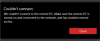
I've been trying to connect to the PVM using it's Internal IP address. Every time I start the connection, I get this message:
Inversely, I've connected to the gaming PC from the PVM, so I know that one direction works. But I'm stumped on why the Remote Desktop app on the Gaming PC is unable to find the Virtual Machine on the network when the Gaming PC's network folder shows the PVM.

Anyone got any ideas? Feel free to ask about anything else that could be helpful to get this working. Again this is mostly just out of curiosity.
So I have a Windows 10 Pro Desktop (Gaming PC) and a MacBook Pro 2015 running a Windows 10 Home Parallels Virtual Machine. I'm wanting to use the Remote Desktop app available in Windows 10 to connect from the Gaming PC to the Windows 10 PVM.
I've been trying to connect to the PVM using it's Internal IP address. Every time I start the connection, I get this message:
Inversely, I've connected to the gaming PC from the PVM, so I know that one direction works. But I'm stumped on why the Remote Desktop app on the Gaming PC is unable to find the Virtual Machine on the network when the Gaming PC's network folder shows the PVM.
Anyone got any ideas? Feel free to ask about anything else that could be helpful to get this working. Again this is mostly just out of curiosity.


