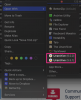
When I right-click an item in Finder, Finder shows a popup menu. The menu has an "Open With" menu item to open the file using an application.
For .zip files, I installed BetterZip as default and several other applications to handle zip files. I also installed Parallels Toolbox, so "Unarchive (6.0.2)" and "Unarchive (5.5.1)" are listed alongside these apps. I never use Unarchive tool from Parallels Toolbox because I already have enough unarchiver. I didn't add to Dashboard. I checked System Settings | Keyboard | Keyboard Shortcuts | Services, but nothing related is listed.
How can I remove Parallels Toolbox apps from my Finder menu of "Open With" if it's not listed in a Dashboard?
For .zip files, I installed BetterZip as default and several other applications to handle zip files. I also installed Parallels Toolbox, so "Unarchive (6.0.2)" and "Unarchive (5.5.1)" are listed alongside these apps. I never use Unarchive tool from Parallels Toolbox because I already have enough unarchiver. I didn't add to Dashboard. I checked System Settings | Keyboard | Keyboard Shortcuts | Services, but nothing related is listed.
How can I remove Parallels Toolbox apps from my Finder menu of "Open With" if it's not listed in a Dashboard?