Required permissions

info@tcbel.com

Bit poster
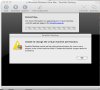
Hi, just upgraded to version 4 from version 3. When converting the virtual machines (WIN XP) I get this message:

Parallels Desktop cannot set required permissins for on or more object in the virtual machine folder. Contact support...

I tried to repaie persmissions on my MHD, and din't solved the problem.

Please help, cant work....

Thanks,

Ben
 

Attachments

  • parllelsproblem.jpg
    parllelsproblem.jpg
    156.9 KB · Views: 4
1. backup Virtual Machine version 3 to another location (external disk)
2. Open Terminal, navigate to Virtual machine location say cd Documents/Parallels (adjust to your location)
3.
chmod -R 777 ./
4. Start Parallels Desktop and double click pvs file inside Virtual Machine.
5. As you did backup it on step 1. select Convert
 
help with Terminal fix

John I am trying to use the "permissions" fix you list using Terminal but do not think I am doing it correctly. Below is the text from Terminal. See if you can tell me what is incorrect with what I am entering. I have been struggling for days with this upgrade. I have a completely new machine built in PD4 from the ground up that is running fine but really need to convert this old VM.

larry-haleys-computer-2:~ LHlaptop$ /volumes/windows/xp.pvs chmod -R 777 ./
/volumes/windows/xp.pvs: line 1: [System]: command not found
/volumes/windows/xp.pvs: line 2: Boot: command not found
/volumes/windows/xp.pvs: line 3: syntax error near unexpected token `('
/volumes/windows/xp.pvs: line 3: `Parallels VM Name = XP (1) (1)'
larry-haleys-computer-2:~ LHlaptop$


Thanks
 
1. Virtual Machine should be stopped
2. cd /volumes/windows
3. chmod -R 777 ./
However about 2 command I am not sure, where exactly is your VM located?
 
Back
Top