Restoring from a pvm file

Mark F

Member
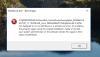
Yesterday (2/16) on the Mac side I got hit with ransomware. After an couple of hours of work I was able to free my iMac but this morning when I opened Parallels (v13.2.0) I got the error message in the attached file. I thought the easiest way to fix this would be to simply restore (using the Time Machine backup) the Widows 10.pvm file from before the trouble began with the ransomware. But the error message keeps coming up and I do not know why. Any help would be appreciated.

Thanks.

Mark F.
 

Attachments

  • Screen Shot 2018-02-17 at 2.56.01 PM.png
    Screen Shot 2018-02-17 at 2.56.01 PM.png
    663.3 KB · Views: 2
Yesterday (2/16) on the Mac side I got hit with ransomware. After an couple of hours of work I was able to free my iMac but this morning when I opened Parallels (v13.2.0) I got the error message in the attached file. I thought the easiest way to fix this would be to simply restore (using the Time Machine backup) the Widows 10.pvm file from before the trouble began with the ransomware. But the error message keeps coming up and I do not know why. Any help would be appreciated.

Thanks.

Mark F.
You can try to reset Windows if you don't have any important files and applications then check.
 
Thanks but if I do a reset I lose one of my important applications. But I do not understand why replacing the .pvm file with one from a few days ago does not solve the problem. Would you have any insight on that?

Thanks again.
 
Thanks but if I do a reset I lose one of my important applications. But I do not understand why replacing the .pvm file with one from a few days ago does not solve the problem. Would you have any insight on that?

Thanks again.
You can restore from the Time machine backup but if the ransomware has corrupted the backup then you might face same issues.
 
Back
Top