I recently bought the Macbook Pro 13 with TouchBar the 2017 edition.
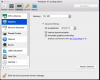
After installing Parallels 12 I saw that the fonts Parallels Control center itself's (as well as the guest systems) are blurry.
Parallels support didn't give me any answer (Tried removing, reinstalling, all sorts of things)
(For instance, the "Enable retina resolution checkbox is not available")
My assumption is that parallels doesn't recognize that I run on a retina display.
Now I upgraded to Parallels 13 and still get the same issue.
After installing Parallels 12 I saw that the fonts Parallels Control center itself's (as well as the guest systems) are blurry.
Parallels support didn't give me any answer (Tried removing, reinstalling, all sorts of things)
(For instance, the "Enable retina resolution checkbox is not available")
My assumption is that parallels doesn't recognize that I run on a retina display.
Now I upgraded to Parallels 13 and still get the same issue.