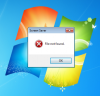
D doovers Junior Member Mar 13, 2014 #1 I'm getting the following error when parallels locks windows 7. Closing it just makes the message box disappear and I need to press ctrl-alt-del to get back to the ctrl-alt-del screen. I have no screen saver set. How can I fix this?
I'm getting the following error when parallels locks windows 7. Closing it just makes the message box disappear and I need to press ctrl-alt-del to get back to the ctrl-alt-del screen. I have no screen saver set. How can I fix this?
L Looran@Parallels Parallels Support Mar 27, 2014 #2 Hi doovers, Please try to use the System file check tools on the Windows operating system. You can follow the steps outlined on the below link: http://support.microsoft.com/kb/929833 Also, please try to re install Parallels Tools following all steps on this article: http://kb.parallels.com/8969 Thanks, Looran
Hi doovers, Please try to use the System file check tools on the Windows operating system. You can follow the steps outlined on the below link: http://support.microsoft.com/kb/929833 Also, please try to re install Parallels Tools following all steps on this article: http://kb.parallels.com/8969 Thanks, Looran
D doovers Junior Member Mar 30, 2014 #3 Hi Looran, I tried both of your suggestions but neither resolved the problem. Anything else I can try? Thanks! Looran@Parallels said: Hi doovers, Please try to use the System file check tools on the Windows operating system. You can follow the steps outlined on the below link: http://support.microsoft.com/kb/929833 Also, please try to re install Parallels Tools following all steps on this article: http://kb.parallels.com/8969 Thanks, Looran Click to expand...
Hi Looran, I tried both of your suggestions but neither resolved the problem. Anything else I can try? Thanks! Looran@Parallels said: Hi doovers, Please try to use the System file check tools on the Windows operating system. You can follow the steps outlined on the below link: http://support.microsoft.com/kb/929833 Also, please try to re install Parallels Tools following all steps on this article: http://kb.parallels.com/8969 Thanks, Looran Click to expand...
L Looran@Parallels Parallels Support Mar 31, 2014 #4 Hi doovers, Please respond to the private message that has been sent to your inbox. Thanks, Looran