Mac OS X 10.4 running a Windows XP Pro SP3 install via Parallels 5.
Long story short:
I have windows batch (.bat) files, that I am viewing in Finder.
I want to be able to double-click (or apple-o) them, and have them run in my windows VM.
Currently, they open in Notepad.
If I try to change the program that they open with, Mac OS will not let me select a ".exe" file (means: I cannot select ANY windows programs) as the default program.
I can change whether .bat files are opened in the Windows VM, or the Mac OS Host, but I cannot change the windows program that they are opened with, when I open them from the Mac Finder.
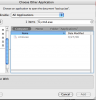
I have attached a screenshot of my dilemma - windows executables are greyed-out even with "all appications" enabled, so I cannot select them as "default applications" in Mac OS X.
How can I change the windows program that is used to open a file, when I open it from the Mac OS host?
Long story short:
I have windows batch (.bat) files, that I am viewing in Finder.
I want to be able to double-click (or apple-o) them, and have them run in my windows VM.
Currently, they open in Notepad.
If I try to change the program that they open with, Mac OS will not let me select a ".exe" file (means: I cannot select ANY windows programs) as the default program.
I can change whether .bat files are opened in the Windows VM, or the Mac OS Host, but I cannot change the windows program that they are opened with, when I open them from the Mac Finder.
I have attached a screenshot of my dilemma - windows executables are greyed-out even with "all appications" enabled, so I cannot select them as "default applications" in Mac OS X.
How can I change the windows program that is used to open a file, when I open it from the Mac OS host?