Greetings,
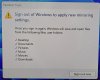
I have a Windows virtual image running in Parallels that displays the message of 'Sign Out of Windows to apply new mirroring settings' when logging into Windows.
No matter how many times I "Sign out now", the message always comes back. It doesn't really do anything to effect the performance of Windows. But, it is annoying.
Details on the environment:
How do I make the 'Sign Out of Windows to apply new mirroring settings' message go away?
Thank you,
Denis
I have a Windows virtual image running in Parallels that displays the message of 'Sign Out of Windows to apply new mirroring settings' when logging into Windows.
No matter how many times I "Sign out now", the message always comes back. It doesn't really do anything to effect the performance of Windows. But, it is annoying.
Details on the environment:
- Parallels Desktop 18.3.2 (53621) is installed on a MacBook Pro (16-inch, M2 Pro, 2023) running MacOS 13.5.
- Parallels Toolbox 6.5.0 is installed.
- Windows 11 Pro 64-bit (Creators 22H2) is installed on the Parallel virtual image.
- The virtual Windows image is bound to an Active Directory domain.
How do I make the 'Sign Out of Windows to apply new mirroring settings' message go away?
Thank you,
Denis