
I'm sorry that I couldn't identify a solution in the forum and thus found no other way than to ask here:
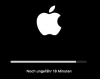
System settings told me the an update for my Mojave 10.14.6 VM should be made (including a Safari update, which to my guessing is the culprit), but after starting that I obviously got a freeze with the following screen. Waiting for an hour didn't help.
Now I even found no way to do a forced shutdown of my Mojave VM. What can I do?
System settings told me the an update for my Mojave 10.14.6 VM should be made (including a Safari update, which to my guessing is the culprit), but after starting that I obviously got a freeze with the following screen. Waiting for an hour didn't help.
Now I even found no way to do a forced shutdown of my Mojave VM. What can I do?