
I'm using Parallels Desktop version 8 and 10.
In my windows7 running guest OS. Some MAC applications does not shown in "Parallels shared Appllications" Menu in Start button.
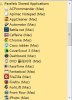
Many MAC OSXs original applications and some other appllications are shown.
BTW many other application can't find in "Parallels Shared Applications" folder. (etc: Apple configurator, bartender, CleanMyMAC, SecureCRT ....)
How can I browse all MAC application in "Parallels Shared Applications" Folder?
I've re-install 'Parallels Tools" many times.
and "Share Mac applications with Windows" check box check/uncheck.
and disable "Isolate Mac from Windows" check box check/uncheck.
If you can't explain what is wrong...
Can you tell me "How 'Paralles Desktop' make '.exe' excutable file from MAC application."?
In my windows7 running guest OS. Some MAC applications does not shown in "Parallels shared Appllications" Menu in Start button.
Many MAC OSXs original applications and some other appllications are shown.
BTW many other application can't find in "Parallels Shared Applications" folder. (etc: Apple configurator, bartender, CleanMyMAC, SecureCRT ....)
How can I browse all MAC application in "Parallels Shared Applications" Folder?
I've re-install 'Parallels Tools" many times.
and "Share Mac applications with Windows" check box check/uncheck.
and disable "Isolate Mac from Windows" check box check/uncheck.
If you can't explain what is wrong...
Can you tell me "How 'Paralles Desktop' make '.exe' excutable file from MAC application."?
