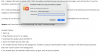
And... it appears that even in version 2.0.0 (1192), the updates mechanism keeps retrying over and over again, every 30 seconds, if a user has cancelled in response to the dialogue "Installer is trying to install Parallels Toolbox."
This is really annoying, particularly if you want to use your computer for something! The software should not be pestering and insisting that you supply your administrator account password for anything! Once per reboot is enough.
Currently, all I can do is shove the dialogue box off the display, but that means that the tools are unavailable from the menu bar.
Update: and I found out what it's actually doing. The "why?" is elusive, though!
Parallels Toolbox:
1. Starts up.
2. Pings Parallels servers for an update.
3. Downloads the update: about 520 MB of it.
4. Starts the Installer process, then quits.
5. The Installer process throws up the dialogue box "Installer is trying to install Parallels Toolbox." and asks for the administrator password. Select the "Cancel" button in this dialogue box.
6. The Installer quits, and Parallels Toolbox starts up again. And, the process repeats.
This means, that the process continues to download the same update package over and over and over again, and there's no way to tell the software "I don't want to install right now". Either you update, or you never run the thing.
This again is a case of the software disabling itself... but here, it's more like a "denial of service" rather than an outright deadlock.
Please, can we have this entire update process reviewed?! It's poorly designed!!!