Stopping Parallels from Suspending on Shut Down

If Parallels is running and I want to shut down the real Mac it is running within, Parallels 7 will commence a SUSPEND and then the Mac will shut down.

I want to change this default so that Parallels 7 NEVER does a SUSPEND. I want it to do a full Shut Down within the Parallels environment or warn me so that I can do a manual full Shut Down of the Parallels environment.

How can I make this preference change within Parallels 7? Thank you.
 
I just do not see it there. Remember, I am trying to tell Parallels, when I shut down or restart my actual Macintosh, do NOT suspend the virtual environment, but actually shut it down as well. This is for a Mac OS X Snow Leopard Server virtual environment.

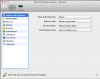
Start Automatically is not applicable;

Startup View is not applicable;

On Shutdown, refers to when I manually Shut Down the Snow Leopard Server Virtual Environment (not the actual Macintosh), and only offers me Keep Window Open, Close Window, and Quit Parallels Desktop [I choose Keep Window Open, so that I can restart Snow Leopard Server with just a simple click on the Window]; and

On Window Close is not applicable and only offers me Suspend, Force to Stop, and Ask Me What to Do.

Here is a screenshot of my Configure -> Options -> Startup and Shutdown [click on the attached image to enlarge]
 

Attachments

  • Screen Shot 2012-06-26 at 1.11.50 AM.png
    Screen Shot 2012-06-26 at 1.11.50 AM.png
    89.2 KB · Views: 3
Last edited:
Back
Top