
robdwright
Bit poster
Hi there, looking for help.
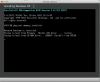
I have been trying to get Windows XP Pro installed on Parallels and have failed. I have spent the day trying to create Windows XP .iso bootable USB as I use a Mac Air. I finally managed to do this and still can't get windows to load. This is as far as I have managed to get - I'm thinking I am not creating the .iso file correctly or its looking for something else.
Any help or direction would be appreciated.
Thanks
Rob
I have been trying to get Windows XP Pro installed on Parallels and have failed. I have spent the day trying to create Windows XP .iso bootable USB as I use a Mac Air. I finally managed to do this and still can't get windows to load. This is as far as I have managed to get - I'm thinking I am not creating the .iso file correctly or its looking for something else.
Any help or direction would be appreciated.
Thanks
Rob