Support Windows 11

Can you make a support of Windows 11?

  • No

    Votes: 0 0.0%
  • Maybe

    Votes: 0 0.0%

  • Total voters
    5

RemyJ

Bit poster
Hey,
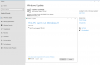
This Monday, I install the Insider Preview of Windows 11 on Parallels Desktop on my MacBook Pro M1. But Microsoft has a minimal requirement for this version of Windows. The Insider program notify me the error (in French). Can you make a support of Parallels Desktops on Windows 11 ?
Thank you.

 

Attachments

  • Capture d’écran 2021-06-29 à 07.13.44.png
    Capture d’écran 2021-06-29 à 07.13.44.png
    123.4 KB · Views: 27
Hey RemyJ,
because Windows 11 is an x64 OS, this won't work on the MacBook Pro M1. This is the same problem, you have to
install Windows 10 ARM and not Windows 10 Home.
Maybe some day they release an ARM Version of Windows 11, then you can play around with this on your M1 Macbook.

Best Regards
 
That's not true at all... Windows 11 runs natively on Surface Pro X and in fact, actually on my MacBook Pro using parallels (Windows on ARM Insider Preview). It is simply that Microsoft made a list of supported processors and it didn't include M1/parallels desktop to get a proper upgrade. So maybe you can contact Microsoft and ask if they can add your software or the M1 to the currently supported CPUs list (it is just a formal list, but the OS works perfectly and even better than Windows 10 on macOS).
 
@RemyJ - Windows 11 WILL install in Parallels. If you're failing the Windows system health check because of a 'TPM' issue, completely shut down the Windows 10 VM and make sure you have a minimum of 4 processors and 4 GB RAM assigned to the VM. Boot it up and try the upgrade process again. It should work for you.
 
@RemyJ - Windows 11 WILL install in Parallels. If you're failing the Windows system health check because of a 'TPM' issue, completely shut down the Windows 10 VM and make sure you have a minimum of 4 processors and 4 GB RAM assigned to the VM. Boot it up and try the upgrade process again. It should work for you.

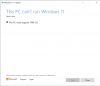
Did all of that and still run into the TPM issue (see attachment).
 

Attachments

  • Screen Shot 2021-07-02 at 7.37.42 AM.png
    Screen Shot 2021-07-02 at 7.37.42 AM.png
    95.4 KB · Views: 45
I installed Windows 11 on my Intel iMac running Parallels yesterday using an ingenious method I found on the web. Assuming you have both the Windows 10 and 11 ISO files, you just replace the INSTALL.WIM folder in the Windows 10 ISO file with the INSTALL.WIM folder from the Windows 11 ISO file. The computer than thinks you're installing Windows 10 and does NOT check for the TPM. It seemed to take about half an hour but it worked. There is a free program called Anyburn that works with ISO files.
 
Came across a video a guy made on how to bypass the TPM check, pull out a .dll temporarily then put back. Worked for me upgrading the Win10 dev preview VM to Win11
 
Same here. Did you get any error messages to continue debug on? This is what I get:
 

Attachments

  • Schermafbeelding 2021-07-04 om 15.30.22.png
    Schermafbeelding 2021-07-04 om 15.30.22.png
    44.6 KB · Views: 14
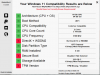
You can see from the attached image why the normal install of Win 11 won't run on an Intel Imac in Parallels.
 

Attachments

  • whynotwin11.PNG
    whynotwin11.PNG
    122.8 KB · Views: 33
I have Windows 11 running fine on a MBP M1. It upgraded from the Windows 10 ARM Dev build. MS says you need to have installed prior to the June 28 date or you must use one of the workarounds others are suggesting (though I'm not advocating them). My only issue with 11 on my MBP is it still says I don't meet the minimum hardware requirements and can only use the "flighting" installs and revert back to my Pro 10 license when the official version is released. But I suspect this is because the Parallels 16.5.1 VM does not support the TPM 2.0 requirement for Windows 11 for a VM. Parallels even says in hte kb that the TPM is only supported on Intel versions of Parallels at this time.
 
The installation isn't the issue for many of us. If you have parallels 17 and the pro edition, you can add the TPM 2.0 to the VM. The issue now for everyone is the inability to switch from Dev to Beta channel because the Directx 12 (dxdiag) shows a WDDM of 1.3 and you need 2.0 for Windows 11. It still runs as "flighting" in the main Dev channel. Many of us have reported technical data reports in another thread and Parallels says they are working on the issue.
 
The installation isn't the issue for many of us. If you have parallels 17 and the pro edition, you can add the TPM 2.0 to the VM. The issue now for everyone is the inability to switch from Dev to Beta channel because the Directx 12 (dxdiag) shows a WDDM of 1.3 and you need 2.0 for Windows 11. It still runs as "flighting" in the main Dev channel. Many of us have reported technical data reports in another thread and Parallels says they are working on the issue.
Thanks for this. I was searching why I couldn't switch from Dev to Beta. I could do it on my Mac Mini with Intel, but couldn't do the same on my MBA with M1.
 
@RolandoN1 Precisely. The issue is only on the M1s at this time. I'm sure they'll get it going sometime soon. Fixing the WDDM has got to be a lot easier than the TPM issue was! But it sure goes to show us how temperamental Win 11 can be! I do see a change regarding the TPM though. When Parallels 17 first was released, it only mentioned a virtual TPM (2.0) for Pro users. If you check the stats now, it says you can have one on the Standard, not subscription one, too.
 
My issues was that I couldn't change the level back to "Dev" and was stuck on the "your machine can't run Win 11".
The YouTube showed me the proper way ... and I wasn't even getting the TPM issue, only my RAM was (automatically) set to only 3GB instead of 4GB.
11 now flying in ...
 
btw. initially I wasn't able to change the level in Windows Update and only got "can't talk to the servers" or similar issues.
The I realized the machine run behind a PiHole ... stopping that and the error disappears. Seems PiHole blocked something Windows Update needed ...
 
Anyone heard anything from Parallels about an official WDDM 2.0 patch/fix for Windows 11 under Parallels 17 for M1 Macs so that we can switch to Beta from Dev channel (i.e. have actual compatibility) without running the unofficial script floating around out there? They've been silent in these forums even though many of us submitted technical report data.
 
Please rest assured that we are working hard to provide compatibility with Windows 11 by its official launch, this is not an easy task, and there are no details we can share at the moment.

P.S. But we diligently read your feedback at all channels, including here ;)
 
Please rest assured that we are working hard to provide compatibility with Windows 11 by its official launch, this is not an easy task, and there are no details we can share at the moment.

P.S. But we diligently read your feedback at all channels, including here ;)
Thank you as those of us flighting Windows 11 on our M1s with Parallels 17 are being told to switch to the "Beta" channel in emails from MS, but we are as yet unable to do so because of the (as yet) unresolved WDDM 2.0 driver compatibility issue .
 
That's not true at all... Windows 11 runs natively on Surface Pro X and in fact, actually on my MacBook Pro using parallels (Windows on ARM Insider Preview). It is simply that Microsoft made a list of supported processors and it didn't include M1/parallels desktop to get a proper upgrade. So maybe you can contact Microsoft and ask if they can add your software or the M1 to the currently supported CPUs list (it is just a formal list, but the OS works perfectly and even better than Windows 10 on macOS).
I have M1 MacBook air 2020 running Parallels 17. I just downloaded windows 11 ARM ISO from Microsoft VHDX and created the VM using Parallels. After installation completed, I signed into my Microsoft account in Windows 11 under accounts in settings. I then activated windows from settings - activations as I had a windows 10 pro license linked to my Microsoft account (you do not need to do this if you do not want to). Parallels did a smooth installation. I was getting PC not supported error when using an insider preview version of windows 11 earlier (I upgraded through windows 10 insider preview). After I created the new VM using the windows 11 ARM ISO recently released (not insider preview), PC not supported error went away. I now have Windows 11 ARM version running through Parallels 17 smooth on my M1 MBA. It is super fast, no errors and all programs run very well. I use all office programs like MS Office, Zoom, Webex, Adobe 32bit, Teams, Edge, Chrome, excel works so well with macros which is amazing.....I am glad PC not supported error went away with a fresh ISO install.
 
Back
Top