There was a problem updating Parallels Tools - install stops at 51%

PascalD3

Bit poster
Hi,
I just updated to the latest build (13.2.0.43213) yesterday and I can't complete the installation of the Parallels tools... It always fails at 51%
Windows 10 Guest OS.
I have an urgent need to have this VM working.

Is there a way to revert back to the previous 13.1 build or a way to work around this installation issue?
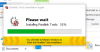
Screen Shot 2017-11-23 at 10.47.32.png
Thanks,

Pascal
 
I have similar issue.

After updating, install of parallels tools failed. Tried resetting everything, no joy.

I try Actions > Reinstall Parallels Tools ...nothing happens; can't get the tool installer to work.
 
I have Windows 10, patched to the latest.

I ended up going through the entirety of the following article:

http://kb.parallels.com/ca/112609


I worked through EVERYTHING in the article, finally completing the fully manual install at the very end.

For the final step, I manually start the install wizard. The wizard fails, as follows:

Parallels Tools Installer Information
Error 1336. There was an error creating a temporary file that is needed to complete this installation.
Folder: C:\Users\Public\Desktop\. System error code: 2


Using Windows Explorer, I inspected that directory. The correct path apparently needs to be:

C:\Users\Public\Public Desktop\
 
Okay, I had same issue as the OP, and I have determined that it was necessary to disable Windows Defender Antivirus.

I had been following these instructions:
http://kb.parallels.com/ca/111730

...and I had progressed to needing the following article about how to reinstall Parallel Tools:
http://kb.parallels.com/ca/4841


After uninstalling existing Parallels tools (dated from a month ago), I turned off Windows Defender using these instructions:

https://support.microsoft.com/en-ca/help/4027187/windows-turn-off-windows-defender-antivirus


I found that Actions > Reinstall Parallels Tools did not launch.

So I manually launched the DVD Drive (D:): Parallels Tools, where the installation proceeded through 100%.

I then re-enabled Windows Defender, then relaunched Windows.

My system appears to be fine now.
 
I tried everything on that page and still no success
I tried to start the installation manually and the message is Failed to install driverprl_tg
 
Have exactly the same problem now, after my recent upgrade to 13.3.2. Support was at it for 3hrs, couldn't solve it.
 
It seems disabling Windows Defender 'real time scanning', while manually launching 'Install Parallels Tools' from the menu worked. Just remember to enable Windows Defender again!
 
It seems disabling Windows Defender 'real time scanning', while manually launching 'Install Parallels Tools' from the menu worked. Just remember to enable Windows Defender again!
Hi AlexA2. Thanks for sharing the steps which resolved the issue. Please post again for any additional queries.
 
hello
i need to know how you guys turned off windows defender because i cant turn it off on my parallels
 
Back
Top