Too much space allocated

ralfb1

Member
On my High Sierra iMac with parallels 12 I have a Windows 7 VM.
This VM occupies app. 600 MB space. In Windows I can see 245 MB usede onDisk,
260 MB free.
Trying to free memory from the parallels control center gave my app. 20 MB, not more.
Has anybody an idea what I can do to shrink this VM?
 
I
Hello @ralfb1 , please follow the steps provided at http://kb.parallels.com/123553 to manage disk space.
Thanks
followed it.
And now I can see with nice graphic view what knew before. The Windows 7 VM occupies app. 600 GB of disk space.
Inside the VM, Windows tells me, 245 GB in use, 260 GB free. How can I get al least 200 GB of the free Windows VM Space back to the Mac?
The Reclaim button gave me 20 GB back, but this is far away from 260.
Sorry, in my first post it was not MB, but GB.
 
ok,
so I have to live with 260 GB unused on the Windows 7, and space problem on my mac host?
Hi @ralfb1,
Expanding disk is a file that stores an image of an expanding virtual disk and resides on your host OS.
While a plain virtual hard disk image file has a fixed size that is determined when the disk is created, an expanding virtual hard disk image file is small initially, its size grows as you add applications and data to the virtual hard disk in guest OS. Please check out this article for more information.
 
So, there is no way to make a virtual machine smaller? Even when the Harddisk on this VM has 200 Gbyte free?

Is the only way to install a new VM, and make everything new?
 
So, there is no way to make a virtual machine smaller? Even when the Harddisk on this VM has 200 Gbyte free?

Is the only way to install a new VM, and make everything new?
Please send a technical report via Help menu > Send Technical Data... Please post the report ID here.
 
Guys, please check if have Snapshots or SmartGuard enabled. It might be a reason.
 

Attachments

  • Screen Shot 2017-12-11 at 17.08.13.png
    Screen Shot 2017-12-11 at 17.08.13.png
    200.1 KB · Views: 15
Here is the report ID: 232763605
I treid to released 240 GB with Partition Wizard as decribed in kb 12025. But still the 240 GB can not get back to the host.
What can be done?
 
@JosephL6: No the problem is not solved and I feel somw kind of giving up parallels for this. It seems that there is no control over the memory a virtual machine occupies.
Even worse is, if I launch a snapshot, parallels starts to increase the used memory of this VM until the harddisk is full, und the MacOS gives up.
Why is there no test, if there is enought available memory for a snapshot?
 
Hello Alexg,
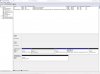
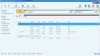
here is the screen shot
 

Attachments

  • HD_Partition.JPG
    HD_Partition.JPG
    151 KB · Views: 4
  • HD_Partition_W.JPG
    HD_Partition_W.JPG
    156.3 KB · Views: 4
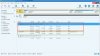
ralfb1, i have attached the modified screenshot. In red - the partitions to support Bootcamp imported VM. It take zero bytes on your Mac disk. In green - imported Bootcamp partition with Windows. The size is 240 GB total, and 173 GB is used. In this case the whole VM (.pvm) should take about 180 GB on the Mac disk. But, in your report i see the snapshot:

193244168192 Dec 24 13:55 Importiert Windows 7 Boot Camp.hdd.0.{5fbaabe3-6958-40ff-92a7-860e329aab41}.hds
345522454528 Nov 1 2016 Importiert Windows 7 Boot Camp.hdd.0.{650cc9d5-ef55-4184-8ba5-24bd6cfdbcaa}.hds <- snapshot

It takes about 345 Gb, and original disk (in green) 193 Gb. In total it is 538 Gb on Mac disk. Everything is clear. I do not see how we can fix it without deleting the snapshot. Please check the snapshot manager and remove the unnecessary.
 

Attachments

  • HD_Partition_W.JPG
    HD_Partition_W.JPG
    162 KB · Views: 6
Hello Alexg,
unfortunately there is no snapshot
 

Attachments

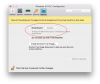
  • Bildschirmfoto 2017-12-27 um 15.56.58.png
    Bildschirmfoto 2017-12-27 um 15.56.58.png
    54.3 KB · Views: 1
ralfb1, It seems a hidden snapshot somehow. So, you need to delete it manually by using Terminal commands. There is an example:

Important Note: Make sure you have 200GB of free space (in your case) at least on your Mac to successful deleting the snapshot.

1. Shutdown you VM.
2. Launch Terminal.app (/Applications/Utilities folder)
3. List all your registered VMs by prlctl list -a command. I have marked by red color the target VM.
4. Copy its ID and execute the prlctl snapshot-list command
5. Delete the snapshot by using prlctl snapshot-delete command and use ID of VM (in red) and ID of Snapshot (in blue)

alexanders-mbp:vm alexg$ prlctl list -a
UUID STATUS IP_ADDR NAME
{15f76d21-b4b5-4807-857d-826c69b8fc9d} suspended - Windows 10 1703
{f86a10cc-9fdb-4568-ba9c-528e30197f30} stopped - Windows 2000 SP4 x32 UP

alexanders-mbp:vm alexg$ prlctl snapshot-list {f86a10cc-9fdb-4568-ba9c-528e30197f30}
PARENT_SNAPSHOT_ID SNAPSHOT_ID
*{98934153-051b-41c4-a57d-cf9e83fed378}

alexanders-mbp:vm alexg$ prlctl snapshot-delete {f86a10cc-9fdb-4568-ba9c-528e30197f30} -i {98934153-051b-41c4-a57d-cf9e83fed378}


Delete the snapshot...
The snapshot has been successfully deleted.
alexanders-mbp:vm alexg$
 
Last edited:
Hello alexg,

thank you for the advices. This is the result:
alfs-iMac: Parallels ralfmbrinkmann$ prlctl list -a
shell-init: error retrieving current directory: getcwd: cannot access parent directories: No such file or directory
chdir: error retrieving current directory: getcwd: cannot access parent directories: No such file or directory
/usr/local/bin/prlctl: line 23: cd: /Volumes/Drive_Y/Daten II/Backup/Parallels: No such file or directory
chdir: error retrieving current directory: getcwd: cannot access parent directories: No such file or directory
UUID STATUS IP_ADDR NAME
{de913113-b51b-4605-831b-2f9e29ed9e21} stopped - Anderes Linux
{8947e84b-f40e-43c4-b202-d69b2a668db5} invalid - Debian GNU Linux
{f7cd609e-22aa-46ed-ac4c-85d7e7bf68db} invalid - Windows 10
{05af89f7-68ca-4ef1-9db2-4301c58c8baa} stopped - Windows 7 Ultimate
{7532a044-0d9c-468a-84f5-52f7789e6c4c} invalid - Windows XP
ralfs-iMac: Parallels ralfmbrinkmann$


ralfs-iMac: Parallels ralfmbrinkmann$ prlctl snapshot-list {05af89f7-68ca-4ef1-9db2-4301c58c8baa}
shell-init: error retrieving current directory: getcwd: cannot access parent directories: No such file or directory
chdir: error retrieving current directory: getcwd: cannot access parent directories: No such file or directory
/usr/local/bin/prlctl: line 23: cd: /Volumes/Drive_Y/Daten II/Backup/Parallels: No such file or directory
chdir: error retrieving current directory: getcwd: cannot access parent directories: No such file or directory
The command is available only in Parallels Desktop for Mac Pro or Business Edition.
ralfs-iMac: Parallels ralfmbrinkmann$


to achive the min. 250 GByte of feee space I have removed several VMs (the invalid one)

regards

ralf
 
Back
Top