Toolbox menu missing Download Video

CharlesJ2

Bit poster
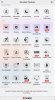
Somehow "Download Video" has gone missing from my Toolbox menu. This was my favorite tool and the prime reason I have a subscription for the app. My version is 3.1.1 (2313). I've attached a screenshot of the menu.
If I uninstall and reinstall, should that cure the problem? Or must I purchase another Parallels toolkit because it's been moved?
 

Attachments

  • Toolbox Menu.jpg
    Toolbox Menu.jpg
    92.6 KB · Views: 1
Hello,

If you have a subscription for Parallels Toolbox then you should have access to "Download Video" tool.
Let's discover your situation:
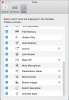
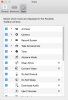
- May be you've turned this tool off in Toolbox preferences? To check it, please: open Toolbox --> press on cogwheel (right top corner) --> Preferences --> 'Tool' tab. Check that "Download Video" tool is presented in the list of the tools and check the state of checkbox.
 
Yep,
looks like the Download Video application has been removed somehow from inside Parallels Toolbox application bundle.
Best solution is to quit from Toolbox, download the latest (3.1.1) version from parallels.com and install Parallels Toolbox again.

Please let me know if it helped.
 
Yeah, I haven't a clue how it was removed. I downloaded ParallelsToolbox-3.1.1-2313.dmg and installed (without uninstalling existing version) and now Download Video shows in the menu and runs.
Back in business. Thanks!
 
Back
Top