I use a HP all-in-one Networked printer, C5180.
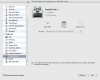
Since I run a PD4 VM based on a Boot Camp install and all the Windows HP apps are installed there, my VM setting is shown in file 16. I've been sending print jobs directly to the HP printer which is set as the default in XP Pro Sp3. Sharing that printer through Mac OSX 10.5.5 and Parallels never worked.
Problems that came up:
While printing features worked fine, I could not get advanced features such as scanning to work without errors.
I also got various HP program errors on closing the VM (Windows shutdown) that required a manual close. Those notorious unresponsive programs...
A reinstall of the HP software did not solve the issue. I tried it for both OSX and the XP Pro VM (in Parallels).
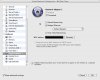
What did allow scanning and Windows to close without complaining was to simply change the network configuration to "Bridged" as shown in file 13.
I kept the MAC Address to the default for my router seemed to set up a different IP for each, even though the MAC was identical according to a list in the router admin screen.
All features now work.
Since I run a PD4 VM based on a Boot Camp install and all the Windows HP apps are installed there, my VM setting is shown in file 16. I've been sending print jobs directly to the HP printer which is set as the default in XP Pro Sp3. Sharing that printer through Mac OSX 10.5.5 and Parallels never worked.
Problems that came up:
While printing features worked fine, I could not get advanced features such as scanning to work without errors.
I also got various HP program errors on closing the VM (Windows shutdown) that required a manual close. Those notorious unresponsive programs...
A reinstall of the HP software did not solve the issue. I tried it for both OSX and the XP Pro VM (in Parallels).
What did allow scanning and Windows to close without complaining was to simply change the network configuration to "Bridged" as shown in file 13.
I kept the MAC Address to the default for my router seemed to set up a different IP for each, even though the MAC was identical according to a list in the router admin screen.
All features now work.