Hi Jigs,
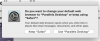
This is due to the fact that you selected the setting VM Configuration > Web & Email > Web Pages: "Open in Windows".
So when VM is running we set the default Mac browser to Windows and when VM is not ready - we set it back to Safari.
Unfortunately macOS doesn't allow to do this silently anymore, and every time require a user approval.
There are 2 options I can think of:
1) Set the Web pages option to "Default" and change default Mac browser in macOS System Preferences - General.
Cons (may be a good thing though) - when VM is not running, and you click a link in macOS, it will be opened in VM browser.
or
2) Disable "Pause Windows when possible" and setp "Always ready in background" (VM config > Startup and Shutdown) to minimize the risk of the message to appear.
Let me know if it helps.