
Install the app
How to install the app on iOS
Follow along with the video below to see how to install our site as a web app on your home screen.
Note: This feature may not be available in some browsers.
You are using an out of date browser. It may not display this or other websites correctly.
You should upgrade or use an alternative browser.
You should upgrade or use an alternative browser.
Two (2) finger swipe gesture - back/forward
- Thread starter Hojbjerg
- Start date

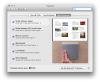
I have my Magic pad configured for 2 finger swipe between pages (page back / forward) and 3 finger swipe to go between full screen apps (see attached).
It works great in OSX Lion, but the 2 finger swipe does a horizontal scroll of a window in my Win7 VM rather than a back/forward.
Any ideas?
It works great in OSX Lion, but the 2 finger swipe does a horizontal scroll of a window in my Win7 VM rather than a back/forward.
Any ideas?
Attachments
Last edited:
I read the documentation. I already have gestures enabled and I also have Apple remote enabled.
The key difference is that I have Lion configured to use two figer swipe as page back/forward and three finger swipe configured for switching between full screen apps (see previous attachment). With this configuration, Parallels does not pass the two finger swipe to the VM.
The key difference is that I have Lion configured to use two figer swipe as page back/forward and three finger swipe configured for switching between full screen apps (see previous attachment). With this configuration, Parallels does not pass the two finger swipe to the VM.
How about a fix Parallels? It just simply doesn't work. And really, the only thing not working is the "back" and "forward" swiping. C'mon, guys! If you can make all the other gestures work, why not the back and forward, too.
Knock, knock... anyone home? The last post here is in March 14.
Knock, knock... anyone home? The last post here is in March 14.
if you want to report an issue, you need to contact tech support via www.parallels.com/support/request
A Workaround
I followed the instructions and I couldn't get this to work using Mountain Lion and Windows 7 as the guest OS.
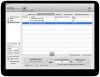
I ended up using a Mac app called BetterTouchTool that lets you set custom gestures per app. I configured it to recognize two-finger swipes in Parallels Desktop and send an alt-arrow keyboard shortcut for back and forward.
I attached a screenshot of the settings I used. The last gesture in the list is a custom configuration for a three-finger double tap to close the current tab. Just a little something I like.
http://blog.boastr.net
I followed the instructions and I couldn't get this to work using Mountain Lion and Windows 7 as the guest OS.
I ended up using a Mac app called BetterTouchTool that lets you set custom gestures per app. I configured it to recognize two-finger swipes in Parallels Desktop and send an alt-arrow keyboard shortcut for back and forward.
I attached a screenshot of the settings I used. The last gesture in the list is a custom configuration for a three-finger double tap to close the current tab. Just a little something I like.
http://blog.boastr.net
Attachments
Nope..... still not fixed. I'm extremely disappointed that this issue has been around for almost four years. I've been resisting my network teams desires for me to switch my team to VMWare Fusion, but one of my guys that left for greener pastures reported that he loves it and has fewer issues. If Parallels doesn't start addressing the quite well documented bugs my team has been experiencing, I may just switch!