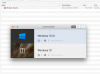
My apologies for this Newbie question. I was running low on disk space on my SSD hard drive so I followed the directions on the Parallels site on how to move the file to my 8TB G-Raid external drive. When I put the other file in the trash, it warned me that deleting the file could effect my programs and files. When I open the Parallels Control Center, I see both Windows 10 virtual machines (the one on the external is called Windows 10 (1). So, can I just empty my trash without messing up my other virtual machine or are the somehow still linked to each other? Any info is appreciated.

Two Windows 10.pvmz files. Can I delete one without effecting the other?
- Thread starter BryanP2
- Start date