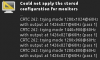
after installing ubuntu10.10 , installing parallels tools, upgrading all linux packages, resizing my monitor to max, and then saving that as my monitor default, i'm getting the following error:

i take it there's something in my system settings i need to update in order to recognize that my parallels monitor as one that can be resized, and can be saved as a different size so it comes back the same after reboot.
…*or, couldn't parallels tools be fixed to do this?
i take it there's something in my system settings i need to update in order to recognize that my parallels monitor as one that can be resized, and can be saved as a different size so it comes back the same after reboot.
…*or, couldn't parallels tools be fixed to do this?