Hi everyone,
In 2022, I purchased a perpetual license for Parallels Desktop 17 for Mac (Standard Edition). It worked fine at the time.
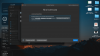
Recently, I reinstalled Parallels, but when trying to activate it, I get a message saying that my license key must be upgraded in order to activate the current version (Parallels Desktop 26), which requires an additional payment.
What concerns me is that I already paid for a perpetual license, yet I'm currently unable to use the product I purchased without paying again. I understand that newer versions are released, but I assumed I would always be able to reinstall and activate version 17, which is the one I bought.
Has anyone experienced something similar?
Is there a way to download and activate the exact version tied to my perpetual license?
Or is there something I might be missing?
Any guidance would be greatly appreciated.
Thanks in advance!
In 2022, I purchased a perpetual license for Parallels Desktop 17 for Mac (Standard Edition). It worked fine at the time.
Recently, I reinstalled Parallels, but when trying to activate it, I get a message saying that my license key must be upgraded in order to activate the current version (Parallels Desktop 26), which requires an additional payment.
What concerns me is that I already paid for a perpetual license, yet I'm currently unable to use the product I purchased without paying again. I understand that newer versions are released, but I assumed I would always be able to reinstall and activate version 17, which is the one I bought.
Has anyone experienced something similar?
Is there a way to download and activate the exact version tied to my perpetual license?
Or is there something I might be missing?
Any guidance would be greatly appreciated.
Thanks in advance!