Using a brand new fully patched Macbook Pro with macOS 10.13.3 and Parallels 13.2.0 (43213) I'm unable to create a new macOS VM from the recovery partition. I receive the error "Unable to create disk image from recovery. Some application, likely DiskUtility is blocking access to recovery image." The "More Details..." button returns a box with only "17" in it. Suggestions on how to proceed?

Install the app
How to install the app on iOS
Follow along with the video below to see how to install our site as a web app on your home screen.
Note: This feature may not be available in some browsers.
You are using an out of date browser. It may not display this or other websites correctly.
You should upgrade or use an alternative browser.
You should upgrade or use an alternative browser.
Unable to Create Disk Image from Recovery
- Thread starter IanL5
- Start date
Arun@Parallels
Parallels Support
Arun@Parallels
Parallels Support
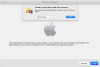
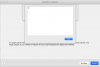
Also, here's the output for 'diskutil apfs list':
Code:
APFS Container (1 found)
|
+-- Container disk1 F61CAE8C-B512-4582-A31F-BBEDCDF9580B
    ====================================================
    APFS Container Reference:     disk1
    Capacity Ceiling (Size):      1000240963584 B (1.0 TB)
    Capacity In Use By Volumes:   346383646720 B (346.4 GB) (34.6% used)
    Capacity Available:           653857316864 B (653.9 GB) (65.4% free)
    |
    +-< Physical Store disk0s2 2B1FFCC7-BFB0-4B9B-898A-5D8A648F7FE7
    |   -----------------------------------------------------------
    |   APFS Physical Store Disk:   disk0s2
    |   Size:                       1000240963584 B (1.0 TB)
    |
    +-> Volume disk1s1 751631A2-D471-477F-9FCE-F3E5482A5D1A
    |   ---------------------------------------------------
    |   APFS Volume Disk (Role):   disk1s1 (No specific role)
    |   Name:                      Macintosh HD (Case-insensitive)
    |   Mount Point:               /
    |   Capacity Consumed:         343485485056 B (343.5 GB)
    |   FileVault:                 No
    |
    +-> Volume disk1s2 5CDE4B20-39D4-4AB6-A313-89C952424E0D
    |   ---------------------------------------------------
    |   APFS Volume Disk (Role):   disk1s2 (Preboot)
    |   Name:                      Preboot (Case-insensitive)
    |   Mount Point:               Not Mounted
    |   Capacity Consumed:         33062912 B (33.1 MB)
    |   FileVault:                 No
    |
    +-> Volume disk1s3 D9D8E0A9-AC0B-4D4E-A54C-5906AA174999
    |   ---------------------------------------------------
    |   APFS Volume Disk (Role):   disk1s3 (Recovery)
    |   Name:                      Recovery (Case-insensitive)
    |   Mount Point:               Not Mounted
    |   Capacity Consumed:         509820928 B (509.8 MB)
    |   FileVault:                 No
    |
    +-> Volume disk1s4 37529050-CB1C-4E6B-8518-DBEA40B19105
        ---------------------------------------------------
        APFS Volume Disk (Role):   disk1s4 (VM)
        Name:                      VM (Case-insensitive)
        Mount Point:               /private/var/vm
        Capacity Consumed:         2147504128 B (2.1 GB)
FileVault: NoIf I download High Sierra in the host and install in Parallels from there I'm coming across another issue which may or may not be related. Using my Time Machine disk I was unable to restore any backup on the guest that was a High Sierra backup. However, I was able to restore from an old Sierra backup. If I attempt to restore any of these backups in the host recovery partition everything works as expected.
I even upgraded to High Sierra in the guest (from the Sierra backup that worked) and still had the same issue. The following screenshot is the consistent error I get when trying to restore from a High Sierra Time Machine backup:
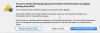
I even upgraded to High Sierra in the guest (from the Sierra backup that worked) and still had the same issue. The following screenshot is the consistent error I get when trying to restore from a High Sierra Time Machine backup:
Ali Hashemi
Bit poster
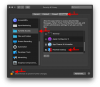
In macOS Catalina (10.15.x) Do just some steps to solving this issue:
- Go to Security & Privacy in System Preferences.
-at the Privacy tab in the sidebar choose "Full Disk Access".
-choose Lock Icon in Botton left corner, and Enter your System Password.
Give Full Disk Access to Parallels Desktop Application by checkbox and live Quite.
- Go to Security & Privacy in System Preferences.
-at the Privacy tab in the sidebar choose "Full Disk Access".
-choose Lock Icon in Botton left corner, and Enter your System Password.
Give Full Disk Access to Parallels Desktop Application by checkbox
and live Quite. Hi all,
I want to create a macOS Catalina VM in Parallels from recovery and run into the same problem described with blocking access by DiskUtility. The Full Disk Access to Parallels Desktop Application is given. Is there a further hint to solve this problem?
Another way would be to create the VM from an image. But I can't get the macOS Catalina image downloaded since there are only macOS Catalina Secure Updates in the App Store available.
Regards anko
I want to create a macOS Catalina VM in Parallels from recovery and run into the same problem described with blocking access by DiskUtility. The Full Disk Access to Parallels Desktop Application is given. Is there a further hint to solve this problem?
Another way would be to create the VM from an image. But I can't get the macOS Catalina image downloaded since there are only macOS Catalina Secure Updates in the App Store available.
Regards anko