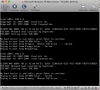
Unable to load Boot Camp Partition: Unable to access hard disk 1

mattr2

Junior Member
Ever since upgrading to PD4, I have been pulling my hair out trying to get Windows XP Pro to see my boot camp partition.

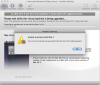
I get the error when trying to load the partition:

------------
Unable to access hard Disk 1
An error occurred when accessing the hard disk: ERROR ID:Invalid argument
-------------

It them ask me to manual finish the upgrade process, which does not work.

How do I fix this?

Boot camp work fine by itself..........Help!!!!
 

Attachments

  • Region capture 3.png
    Region capture 3.png
    177.2 KB · Views: 17
  • Region capture 4.png
    Region capture 4.png
    61.6 KB · Views: 10
I finally figured it out.

When looking for the Boot Camp partition, PD4 could tell I had a BC partition, but it did not know where it was located.

I can to go into Configuration -> Hard Disk 1 and change the IDE Location to "1:0"

For some reason, PD4 was using IDE address "0:0."

It's a shame it took 4 days to find that problem, but at least I am up and running. No other problems to report.
 
I have been using Macs for a while but this is the same issue I am having. Sorry if this sounds stupid, but how do I go into "configuration" and access the hard disk?
 
You can see the confguration menu item under "Virtual machine" on the menu bar while the VM is running, but it can't be changed.

Virtual Machine --> Configure --> Hard Disk

To make changes to the configuraion, Shut down the Virtual Machine. The you shoul dsee the option to Start, Stop, or configure the VM.
 
I don't use bootcamp, but have the same problem. Cannot do anything; after 1 minute the VM freezes and then that message appears: "cannot access hard disk 1. input/output error. Please help.
I read some helpfiles, concerning this error, but they are much too complicated to even understand.
I also did not upgrade, just bought this 4.0 in the shop.
Please help, I have work to do on my VM!
 
Back
Top