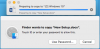
Hello, I'm running Parallels 12 on a late 2017 MBP with High Sierra, and a windows 10 VM. I can browse and read files on the VM C:\ drive from the Host just fine using finder, and I can move files OFF the host C:\ just fine. However, I am unable to place files from the host onto the VM C:\.
I can place files onto my user directory folders (i.e. desktop/documents).
When I try to move files from my host to any non-user folder path in the VM, I get a "Finder want's to Copy "XYZ.xyz". Touch ID or Enter your password to allow this". After I authenticate, the finder error that pops up says: "Items can't be copied to "[C] Windows 10" because you don't have permission to read them."
Anyone have any insight on this? Thanks.
I can place files onto my user directory folders (i.e. desktop/documents).
When I try to move files from my host to any non-user folder path in the VM, I get a "Finder want's to Copy "XYZ.xyz". Touch ID or Enter your password to allow this". After I authenticate, the finder error that pops up says: "Items can't be copied to "[C] Windows 10" because you don't have permission to read them."
Anyone have any insight on this? Thanks.