Good Afternoon
I have installed Parallels Build 8.0.18619 on OSX El Capitan 10.11.3 recently.
i joined the windows Insider program and got my hands on a copy of Windows 10 for testing purposes.
So I fired up my virtual machine 64gb storage, 4gb ram and 2CPU's of my mac mini.
Im running gigabit ethernet into my mac mini and Im looking to share my internet connection with my parallels VM.
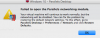
Unfortunately, overtime I spin up my VM, i run into the following error; attached. (Failed to open the parallels networking module).
So I have done my research and found the thread below, explaining that this may be a disk permissions issue http://kb.parallels.com/en/114126
I ran the manual repair permissions commands as root in terminal as set out in those instructions and the only clue I have that may help is that no directory was found when doing the following;
sam$ sudo launchctl stop com.parallels.desktop.launchdaemon
sasha:~ sam$ sudo chown -R root:wheel "/Library/Parallels/Parallels Service.app/Contents/Kexts/10.6"
chown: /Library/Parallels/Parallels Service.app/Contents/Kexts/10.6: No such file or directory
sasha:~ sam$ sudo launchctl start com.parallels.desktop.launchdaemon
Please can somebody point me in the right direction, Im trying to simply get my windows VM connected to the internet but this networking module error is getting in my way
Sam
I have installed Parallels Build 8.0.18619 on OSX El Capitan 10.11.3 recently.
i joined the windows Insider program and got my hands on a copy of Windows 10 for testing purposes.
So I fired up my virtual machine 64gb storage, 4gb ram and 2CPU's of my mac mini.
Im running gigabit ethernet into my mac mini and Im looking to share my internet connection with my parallels VM.
Unfortunately, overtime I spin up my VM, i run into the following error; attached. (Failed to open the parallels networking module).
So I have done my research and found the thread below, explaining that this may be a disk permissions issue http://kb.parallels.com/en/114126
I ran the manual repair permissions commands as root in terminal as set out in those instructions and the only clue I have that may help is that no directory was found when doing the following;
sam$ sudo launchctl stop com.parallels.desktop.launchdaemon
sasha:~ sam$ sudo chown -R root:wheel "/Library/Parallels/Parallels Service.app/Contents/Kexts/10.6"
chown: /Library/Parallels/Parallels Service.app/Contents/Kexts/10.6: No such file or directory
sasha:~ sam$ sudo launchctl start com.parallels.desktop.launchdaemon
Please can somebody point me in the right direction, Im trying to simply get my windows VM connected to the internet but this networking module error is getting in my way
Sam