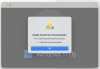
Unable to start the virtual machine.

Discussion in 'Windows Virtual Machine' started by ChrisR49, Mar 28, 2026.

  1. ChrisR49

    ChrisR49

    Messages:
    1
    upload_2026-3-28_22-21-35.png

    I just upgraded my M1 MacBook Pro to an M5 Pro MacBook Pro. I re-downloaded Parallels 19, tried to install Windows 11, and this is what I get. I have tried opening support tickets, but I am not hearing back from Parallels support.

    I have downloaded Windows via Parallels. It tries to launch and I get this error (before installation of Windows).
    I have downloaded the ISO directly from Microsoft. Same error.

    I did this on my M1 MacBook Pro, and it worked flawlessly. Can I get some help here?
     
  2. Trishna Oobeyram

    Trishna Oobeyram Staff Member

    Messages:
    559
    Hello @ChrisR49
    1. Reproduce the issue.
    2. Collect a technical report. To generate the report, right-click on the Parallels icon in the Dock > Help > Send technical data > check "Attach screenshots..." > press Send Report, and provide us with the report's 9-digit ID in reply to this email.
    Regards,
     
  3. EugeniM

    EugeniM Bit poster

    Messages:
    2
    I HAVE THE SAME ISSUE: "unable to start the virtual machine", I've already chek about permissions (HARD DISC ACCESS, ACCESSIBILITY AND SCREEN...), NO WAY, ALSO UPDATING TO V.26 SAME ISSUE.
     
  4. EugeniM

    EugeniM Bit poster

    Messages:
    2
    I HAVE THE SAME ISSUE: "unable to start the virtual machine", I've already chek about permissions (HARD DISC ACCESS, ACCESSIBILITY AND SCREEN...), NO WAY, ALSO UPDATING TO V.26 SAME ISSUE. I've already sent report 525252923. Thanks.
     

Share This Page