unexpected error (512) xp install

mattskillz

Bit poster
please help

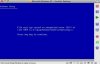
i am running leopard 10.5.2, parallels desktop 3.0 for mac build 5584 but windows doesn't seem to fully install or launch. keeping getting an error message - please see attached pic.

anyone else having this problem - any ideas on how to fix it? i'm trying to install xp from an original disk - oem version that i bought. it's xp pro Version 2002.

thanks in advance for your support
 

Attachments

  • Picture 2.jpg
    Picture 2.jpg
    11.5 KB · Views: 13
Hello Mattskillz,

What is your Guest OS? Is it Windows XP or Vista?

Best regards,
Xenos
 
Last edited:
Hello Mattskillz,

Please sorry I have not noticed the abbreviation OEM in your first post...

OEM software is only distributed when it’s sold with a computer. Installing OEM software on another machine usually violates the software’s license agreement and may not work with Parallels Desktop for Mac.

Best regards,
Xenos
 
thx - it was actually the original disk that was corrupted. we bought 2 copies for the office for 2 machines and the other disk worked. i'm now in business - thank you for your help.
 
Error 512

Help... I am also getting the Error Message 512 when I try to install WinXP on my new MacBookPro. I finally downloaded the updated 5584 Build and successfully downloaded Parallels. Then I tried to download WinXP Home, a new full version, retail boxed copy that I purchased just for Parallels Desktop...without success. The message I get repeatedly is Error 512.

Does this mean that my new copy of WinXP is corrupt? Or is there an easy fix? Is there anyone out there that can help me? I am totally frustrated!
 
I am also getting Error 512.

Installing Windows XP Pro OEM on Macbook. I know about the warnings regarding OEM software but I do know someone else who managed to install with the same software.

Is it possible I don't have enough RAM? I haven't upgraded to 2 GB yet, though my new memory is coming in the mail...

Most of all, is there a guide for decoding Windows install errors?
 
solved

Turns out I just had to update Parallels to the newest build. Of course it's running slow but when I upgrade my memory I think all will be well...
 
Back
Top