Hi,
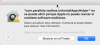
After Mac OS X Catalina upgrade, when I launch Uninstall App from Parallels Toolbox, it shows endless error messages until I reboot my machine saying (translated from Spanish to English):
Please find attached to this message the corresponding screenshot.
Thanks,
David
After Mac OS X Catalina upgrade, when I launch Uninstall App from Parallels Toolbox, it shows endless error messages until I reboot my machine saying (translated from Spanish to English):
- "com.parallels.toolbox.UninstallAppsHelper" can't be opened because Apple cannot check it for malicious software
Please find attached to this message the corresponding screenshot.
Thanks,
David