Upgraded to Windows 10 but still shows it as Windows 8.1

RichardS7

Bit poster
Hi. I just upgraded to Windows 10 from Windows 8.1. However, Parallels still recognizes mine as Windows 8.1. Any way to correct it? Thank you.
 
Hi Richard,
If you are asking how to change the name of your vm in the Parallels menu of Vm's under Parallels 11 Pro, Yes there is
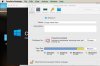
Select the vm in question but do not turn it on>on the Parallels top Menu select Action>Configure...>This will bring up a pop-up box>
select General> You can change the name you have given the vm here and/or the name with the icon to change the name >just enter the name in the NAME: area
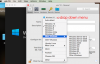
to change the Name with Icon> click or hover over the name icon area a drop down menu will appear, then select the type of vm you wish listed.
 

Attachments

  • changeName.jpg
    changeName.jpg
    37.7 KB · Views: 17
  • changeNameAnd Icon.png
    changeNameAnd Icon.png
    170.3 KB · Views: 14
Hi Kat,
Thank you for your response. I tried both but it won't allow me to make a change. Both Name are and the drop down menu are locked.
 
Hi Richard,
Is the lock at the bottom left unlocked, if not click on it and use your apple admin password to open/unlock the menu.
 
Back
Top