I've got an odd issue. PD 12.
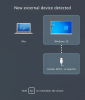
Trying to install a USB device (image sensor) and when plugged in, I can select it like a normal device [first screenshot].
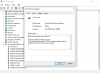
However in device manager in Windows, this error comes up [second screenshot].
Tech support for the company have mentioned that I need to have something called "Passthrough disk" enabled - according to other users.
The product is for Windows, not through Parallels, so it's not something they can guide me on.
Apparently the best version is PD 9, tried to install that but my license goes back to PD 11.
In PD settings, there is nothing about Passthrough disk, although Google shows me that older versions have this option.
Any help is much appreciated, thanks!
Trying to install a USB device (image sensor) and when plugged in, I can select it like a normal device [first screenshot].
However in device manager in Windows, this error comes up [second screenshot].
Tech support for the company have mentioned that I need to have something called "Passthrough disk" enabled - according to other users.
The product is for Windows, not through Parallels, so it's not something they can guide me on.
Apparently the best version is PD 9, tried to install that but my license goes back to PD 11.
In PD settings, there is nothing about Passthrough disk, although Google shows me that older versions have this option.
Any help is much appreciated, thanks!