USB Flash drives connected via Apple USB-C multiport adapter does not work since Creators Update

Pawel Guraj

Junior Member
As mentioned in subject - since Windows 10 Creators Update - all USB flash drives connected via Apple USB-C Multiport adapter (which is the only way to connect any non USB-C device to new MacBook Pro) are not working with Windows. The drive shows in Windows for a while, but when I try to open it in few seconds there is a error message that drive cannot be accessed due to hardware error.

Anybody has same problems?

Using OS X Sierra 10.12.4 and Parallels 12.2.0 (41591)

Br, Pawel Guraj
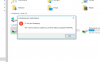
 
Here's the screenshot.
It reads: "E:\ is unavailable. The operation cannot be completed due to device I/O error"

Br, Pawel.
 

Attachments

  • Zrzut ekranu 2017-05-02 o 18.23.24.png
    Zrzut ekranu 2017-05-02 o 18.23.24.png
    109.2 KB · Views: 4
Pawel, please reproduce the issue and send a problem report (menu of Parallels Desktop Help -> Send Technical Data) and post here its number
 
Hi,
I've just sent technical report #177446023
I've also discovered that this happens with Flash drives bigger than 4GB. When smaller flash drive is connected it works as expected.

Br, Pawel.
 
I'd appreciate if you could stop the VM, go to VM Configuration -> Hardware -> Boot Order and entered under advanced setting the Boot Flag
"devices.usb.loglevel=4". Then reproduce the issue and post one more problem report.

As a workaround for the issue I'd suggest to try http://kb.parallels.com/en/122204 (starting from "sudo chmod -R 777 /Library/Preferences/Parallels" part, skipping the part for Windows XP)
 
Last edited:
Thank you for the report. The logs were helpful to understand the issue a bit more.
At the moment it appears that the only workaround is to apply mentioned http://kb.parallels.com/en/122204
PS: Please don't forget to remove the system flag. It generates really a lot of logging.
 
Back
Top