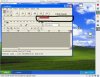
I can't seem to get a usb mic working properly on my MacBook Pro. I've tried an Andrea with a 5370 usb adapter and a couple of other usb mics, but none of them show up anywhere on the Windows side.
The mic does have a check mark in the Parallels console device list, so Parallels thinks it is connected. However, it isn't actually available in Windows. I've tried Dragon Nat Speak, the WIndows recording utility, and Audacity for Windows.
The only sign there a mic connected is that a 'USB composite device" icon with an exclamation mark appears in the WIndows xp Device Manager.
I have released the mic on the mac side, both in System Preferences and the Midi utility.
I've also tried the Audacity workaround for the clipping sound problem but still can't get the mic to appear anywhere. My MacBook Pro's internal mic is the only one available.
Other people have functioning usb mics, so I must be doing something wrong. Any idea what it is?
Thanks,
numa
The mic does have a check mark in the Parallels console device list, so Parallels thinks it is connected. However, it isn't actually available in Windows. I've tried Dragon Nat Speak, the WIndows recording utility, and Audacity for Windows.
The only sign there a mic connected is that a 'USB composite device" icon with an exclamation mark appears in the WIndows xp Device Manager.
I have released the mic on the mac side, both in System Preferences and the Midi utility.
I've also tried the Audacity workaround for the clipping sound problem but still can't get the mic to appear anywhere. My MacBook Pro's internal mic is the only one available.
Other people have functioning usb mics, so I must be doing something wrong. Any idea what it is?
Thanks,
numa
 ...
...