Hello,
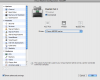
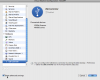
1. In Mac OS X, open System Preferences -> Sharing -> Services and enable the Printer Sharing service.
2. Go to System Preferences -> Print & Fax -> Sharing and make sure that your printer is enabled in the
"Share these printers with other computers" list.
3. Make sure that your printer is able to print from the Mac side (print a test page).
4. In Windows VM download and install Apple Bonjour for Windows ->
http://www.apple.com/support/downloads
/bonjourforwindows.html
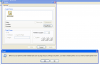
5. When Bonjour installation is complete, start Bonjour Printer Wizard on your Windows desktop.
6. Click Next. Select your printer from the Wizard's Shared Printers list and click Next.
7. You should select either Generic/Postscript driver for your printer or your printer particular model if it's available
in the list. Hit Next.
8. Click Finish and try printing any document using the Bonjour printer.
If Bonjour printer doesn't work after completing Bonjour wizard, do the following - :
1. Uninstall any native drivers for the printer from Windows you may have already installed.
2. Make sure you have selected Bonjour printer when issued print command. Windows may show you several printers
available.