USB Wireless Adapter WUA-2340

fmuhamm

Bit poster
I need to use a USB wireless network adapter, because our company's wireless network uses certificates and the enterprise authentication via group policy. I am trying to use a D-Link WUA-2340. The adapter works great in Fuson, but not in Parallels. I would much rather use Parallels.

Thanks
 
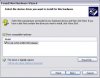
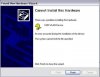
Unfurtunately, I am not able to use the 'Report Problem' option while on the network at work, because of proxy. I installed the new version mentioned above. The guest OS recognizes the adapter, but the OS will not install the driver. I constantly get the message 'Cannot install this hardware. System cannot find the file sepcified'. I did not have the same problem in Fusion. In Parallels, I had to manually select the driver. The driver search option worked with Fusion.

Thanks
 
I constantly get the message 'Cannot install this hardware. System cannot find the file sepcified'. I did not have the same problem in Fusion. In Parallels, I had to manually select the driver. The driver search option worked with Fusion.

Thanks

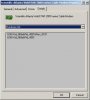
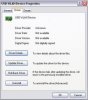
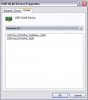
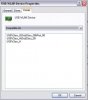
Hm. Could you please if it is possible Right click my computer, select "Manage" -> Device Manager, point to the USB device icon for your modem (most likely it will be under either "Other devices", "Network Adapters" or "Universal Serial Bus Controllers", right-click and select properties on this device and post here two screenshots:
one for "Hardware Ids" and second for "Compatible Ids". For example on my machine for one of my USB devices it looks like

attachment.php


Also it would be helpful if you could post version number of drivers for the D-Link WUA-2340 adapter.

Thank you
 

Attachments

  • HardwareIds.jpg
    HardwareIds.jpg
    9.5 KB · Views: 35
Screen Shots

Added a few more than asked for. Maybe they can help as well.

Thanks for helping me with this issue.
 

Attachments

  • Picture 1.jpg
    Picture 1.jpg
    15.3 KB · Views: 5
  • Picture 2.jpg
    Picture 2.jpg
    13.6 KB · Views: 3
  • Picture 4.jpg
    Picture 4.jpg
    12.2 KB · Views: 2
  • Picture 6.jpg
    Picture 6.jpg
    7.6 KB · Views: 2
  • Picture 7.jpg
    Picture 7.jpg
    7.9 KB · Views: 2
Please reply me with in PM with following information:

* an XML file with a copy of system profile: Applications --> Utilities --> System Profiler --> File
* Guest OS full version with SP included (if they are);
* From /Users/<username>/Documents/Parallels/<VM name>.pvm -CTRL+CLICK -select Show Package Contents
- config.pvs
- prallels.log
* /Library/Preferences/Parallels (right click on folder --> Create Archive)
* /Library/Logs/panic.log
or ~/Library/Logs/CrashReporter/ from the Mac side;
 
Added a few more than asked for. Maybe they can help as well.

Thanks for helping me with this issue.

Thank you! Screenshots were helpful.

Could you please unzip attached win_check.zip file somewhere in the Windows VM and execute win_check.exe and then post here the output? The output should looks like

----
Stage 1:
State 1 completed successfuly.
Press Enter to continue.

or

----
Stage 1:
Stage 1 completed with code 2
State 2 completed with code 0
Press Enter to continue.
----

If you will see the former output with "Stage 1 completed with code 2", please try to connect the D-Link WUA-2340 adapter again. This time it shoud work.
 

Attachments

Last edited:
setupapi.log

[SetupAPI Log]
OS Version = 5.1.2600 Service Pack 3
Platform ID = 2 (NT)
Service Pack = 3.0
Suite = 0x0100
Product Type = 1
Architecture = x86
[2008/12/05 15:31:47 3392.2027]
#-198 Command line processed: C:\WINDOWS\Explorer.EXE
#I060 Set selected driver.
#-019 Searching for hardware ID(s): usb\vid_07d1&pid_3a08&rev_0001,usb\vid_07d1&pid_3a08
#-018 Searching for compatible ID(s): usb\class_ff&subclass_00&prot_00,usb\class_ff&subclass_00,usb\class_ff
#I022 Found "USB\VID_07D1&PID_3A08" in C:\WINDOWS\INF\oem20.inf; Device: "D-Link WUA-2340 USB Adapter"; Driver: "D-Link WUA-2340 USB Adapter"; Provider: "D-Link"; Mfg: "D-Link"; Section name: "WUA2340_DEV.ndi".
#I023 Actual install section: [WUA2340_DEV.ndi.NT]. Rank: 0x00000001. Effective driver date: 05/29/2007.
#-019 Searching for hardware ID(s): usb\vid_07d1&pid_3a08&rev_0001,usb\vid_07d1&pid_3a08
#-018 Searching for compatible ID(s): usb\class_ff&subclass_00&prot_00,usb\class_ff&subclass_00,usb\class_ff
#-019 Searching for hardware ID(s): usb\vid_07d1&pid_3a08&rev_0001,usb\vid_07d1&pid_3a08
#-018 Searching for compatible ID(s): usb\class_ff&subclass_00&prot_00,usb\class_ff&subclass_00,usb\class_ff
#-019 Searching for hardware ID(s): usb\vid_07d1&pid_3a08&rev_0001,usb\vid_07d1&pid_3a08
#-018 Searching for compatible ID(s): usb\class_ff&subclass_00&prot_00,usb\class_ff&subclass_00,usb\class_ff
#I022 Found "USB\VID_07D1&PID_3A08" in y:\downloads\wua2340_drivers_150\drivers\winxp_2k\netA5AGU.inf; Device: "D-Link WUA-2340 USB Adapter"; Driver: "D-Link WUA-2340 USB Adapter"; Provider: "D-Link"; Mfg: "D-Link"; Section name: "WUA2340_DEV.ndi".
#I023 Actual install section: [WUA2340_DEV.ndi.NT]. Rank: 0x00000001. Effective driver date: 06/12/2008.
#-166 Device install function: DIF_ALLOW_INSTALL.
#E154 Class installer failed. Error 2: The system cannot find the file specified.
 
Back
Top