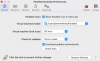
M MinhH1 Bit poster Oct 6, 2020 #1 Before ver16: Click the Parallels icon in the menu bar and choose Configure. If the Parallels Desktop menu bar is visible at the top of the screen, choose Actions > Configure And now i can't see where is my config for network Attachments Screen Shot 2020-10-07 at 00.37.41.png 54.1 KB · Views: 4
Before ver16: Click the Parallels icon in the menu bar and choose Configure. If the Parallels Desktop menu bar is visible at the top of the screen, choose Actions > Configure And now i can't see where is my config for network
A Ajith1 Parallels Support Oct 6, 2020 #2 MinhH1 said: Before ver16: Click the Parallels icon in the menu bar and choose Configure. If the Parallels Desktop menu bar is visible at the top of the screen, choose Actions > Configure And now i can't see where is my config for network Click to expand... Let us know the exact issue you are facing. So we can advise you accordingly.
MinhH1 said: Before ver16: Click the Parallels icon in the menu bar and choose Configure. If the Parallels Desktop menu bar is visible at the top of the screen, choose Actions > Configure And now i can't see where is my config for network Click to expand... Let us know the exact issue you are facing. So we can advise you accordingly.
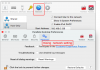
M MinhH1 Bit poster Oct 6, 2020 #3 I try to share Internet connection from Windows Virtual Machine to Mac OS, and this is my parallels version 16 and it don't have network setting, so i can't Attachments Screen Shot 2020-10-07 at 08.49.36.png 107.6 KB · Views: 4
I try to share Internet connection from Windows Virtual Machine to Mac OS, and this is my parallels version 16 and it don't have network setting, so i can't