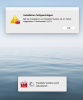
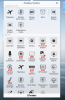
The version is faulty: After the update, the representation is not readable. Setting options for the change are missing. Request for immediate correction of the error.
We're working on fixing this issue. Thanks for informing us.
You can temporarily turn off some visual effects in macOS (open System Preferences -> Accessibility --> Display --> Reduce transparency) or wait till our fix.
It is quite strange.
Is Parallels Toolbox still running after update failure? If yes please send us problem report: open Toolbox -->'gear' button --> Help --> Send Technical data and post its ID here.
No, the Toolbox doesn't run - starting the update, the Toolbox stops and doesn't start again. After that I only can start the old version (with the known bug - see this conversation)!
Could you please send us system logs?
Open Finder window, press Shift + Cmd + G, enter /var/log, select all system logs (system.log, system.log.0.gz, etc) and archive them.
Could you please try to install Toolbox manually downloaded from here?
Anyway we will investigate a problem why Installer on update didn't ask a password.