Video corruption in Windows 7 64-bit guest under Lion 10.7.3 host

Sean S

Junior Member
Hi,

I've only recently, perhaps within the last week, been getting random video corruption on my Windows 7 guest. It has been happening once the VM has been running (in the background) for a few hours.

This corruption presents itself as either the entire guest OS window filling with garbage or only the top/bottom of the screen - title bar or taskbar areas. The corruption clears itself after a short while, but sometime returns. A full reboot clears the problem.

Prior to this I've had no issues at all really, so I can only assume it is a recent update/patch either within Windows (windows update installed a whole slew of updates on 17 Feb) or the host Lion OS (there was a MacBook Pro EFI firmware v2.6 update applied on 13 Feb or the Lion 10.7.3 combo update on 5 Feb).

I'm running Parallels 7 (Build 7.0.15054).

Has anyone else experience any recent issues like this? If so what did you do to resolve?

Thanks in advance.

Sean
 
Last edited:
does it happen in Coherence or Window mode?
You can try to reinstall Parallels Tools
go to Virtual Machine menu > Reinstall Parallels Tools
 
Hi,

This happens in full screen mode. I have re-installed parallels tools, but the problem persists.

Thanks
 
Thanks. I have unchecked "Use animations" but the artefacts/corruptions are still coming back.

I think it must be a conflict with one of the recent OS patches as nothing else has changed.
 
Do you use Time Machine?
If you do, i sugest to revert back before updates has been installes, make a snapshot and try to install updates again without Parallels Tools.
 
Same problem here

I have the exact same problem. If I resize the window it will clear the scrambled video but will return again soon enough. I don't have an issue with ubuntu or windows xp - only windows 7 64 bit. Kind of frustrating really. I just setup a brand new windows 7 VM and am not going to go through the whole process again.
 
Sean, Willem,

Could you generate problem report when your VM screen is in garbled state and post report ID here. See http://kb.parallels.com/9058 for instructions.

If your Macs are 15" or larger MacBook Pros, try changing this setting VM > Configuration > Options > Optimization > Power to Better performance. You'll need to stop and restart your VM for this setting to take effect.
 
I've just noticed a new build (Parallels Desktop for Mac Build 7.0.15055) has been released, so I'm going to deploy that before proceeding with the other next steps suggested.
 
Thanks. The video artefacts/corruption seems to have gone.

I have now:

1. Changed the Optimization > Power to "Better performance" and;
2. Upgraded to the latest Build 7.0.15055

I'll run the VM continuously over the next 48 hours to make sure all is good again.

Regards

Sean
 
I've submitted a problem report (#13384926) that shows this issue. My problem happens when running full screen on an external monitor. Hardware is a macbook air, running Windows 7 32bit under parallels, LION 10.7.3 os. I've updated parallels to the latest release (Build 7.0.15055 Revision 740667; March 5, 2012).

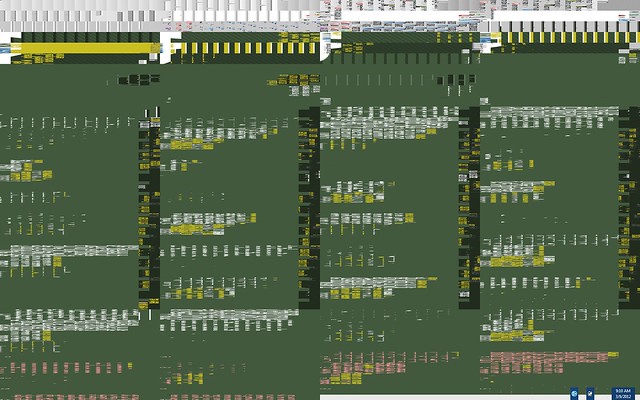
The distorted graphics appear after some delay, and only appear when the windows screen is not active. The image is related to other full screen applications, it is a twisted, corrupted version of the other screen. For example, if one plays full screen video, often a switch to the Windows screen will show a static, corrupted version of the video that was playing. Performing a right click refresh on the windows desktop clears the problem (until some time later). Turning off 3d graphics in the VM hardware settings fixes the problem (but you lose aero graphics).
 
I've got the exact same problem; using a MacBook Air with OS X 10.7.3 installed and hooked to an external Dell monitor via mini displayport, the Apple mini displayport to DVI adapter, and a DVI cable. I'm running Windows 7 in the VM, and running that VM window full-screen. The scrambled video appears when returning to the VM after it has been dormant for a while (often not long though - just a few minutes). For me, forcing screen repaints by clicking the Windows Start button, minimizing/maximizing applications, etc. seems sufficient to fix it. When it does happen, the same scrambled view shows up in the thumbnail view within the Parallels dock icon, as well as in Mission Control.
 
Hi - I think I may have fixed it. My Windows 7 VM was configured to the default of 256MB of video memory. I increased this to 512MB and haven't seen any video corruption since on that VM, so this appears to be the answer.
 
And of course the video corruption reappeared mere minutes after I posted that supposed solution, so it doesn't work after all.
 
Yes, I was just going to reply with the same. The only thing that I've found that works is turning off the 3d acceleration. I've found that playing full screen youtube video (using a mac browser) triggers the problem within minutes for me.

Here is an example:
6820989496_25a9c6872a_z.jpg


You can see a couple windows items peeking through on the right bottom. The rest is from another full screen browser and is unrelated to windows.

You can almost tell I was reading MetaFilter...
 
Same here

I'm seeing the same exact problem here. I tends to present itself after coming back from sleep mode or monitor / screen being off. These problems did not start happening until the recent update was installed. 7.0.15055.

Screen_Shot_2012-03-13_at_9_38_00_AM.png


And it is getting worse each day. Previously I would see it once a day or so, however, it just happened while typing this message.

If I resize the windows VM it corrects the issue temporarily. Also just tested hitting the 'show desktop' button the lower right corner of the VM would correct the display.

Any fix would be greatly appreciated.

Thanks,
ken
 
Back
Top