Video performance

chuck27p

Bit poster
I'm new to parallels and it's pretty darn cool. I'm on a MacBookPro and running windows XP in parallels. Works great, however I do notice that the video performance is not that great. When I move windows around, or if I launch a new window, the view gets all screwy. Windows overlap and look broken and weird. I have to move a window around again for it to go back to normal. Is there a way to fix this? I am using 16MB for video, as it recommends.

Also, is there any reason why I should do the windows updates? I suspect not, but just curious.

Thanks.
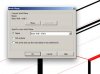
 
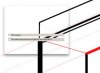
I am seeing a similar problem. Parallels build 5600, Windows XP SP2 and Revit Architecture 2009. About 80% of the time a dialog box will be mostly empty until I drag the dialog off screen then back. You can see the results in the attached screen captures. Needless to say, this makes using Parallels more than a little annoying. Anything from the developer as far as fixes or workarounds?

Thanks,
Gordon
 

Attachments

  • after.jpg
    after.jpg
    13.2 KB · Views: 3
  • before.jpg
    before.jpg
    10.9 KB · Views: 2
Thanks. It seems to have gotten better, somehow. Is less memory then better? I tried increasing it and it got much worse. I brought it back down to 16MB as recommended and it seems to be ok.

Before I go through the process of uninstalling/reinstalling, can I read about what build 5604 includes somewhere, or what does it do?
 
There is a typo in my previous post I mean increase to 64mb
Build 5604, adds Ubuntu 8.04 compatibility, and resolves, problems with Windows flickering, also many code improvements were done
 
Back
Top