VM List Window Cannot be Reopened

I was wondering if anybody else has run into this issue. After I launch Parallels and start a VM, if I close the VM list window it appears there is no way to re-open it. The VM I launched continues to work just fine, but from the parallels icon there is no option to re-open the list and trying to launch parallels a second time from the applications folder does nothing. Am I missing this option or is this a "feature." I am new to Parallels and looking to switch from VMWare Fusion. If it matters I am running Mac OS X 10.6.8.
 
Last edited:
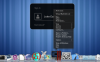
I'm using Parallels 7.0.15050 on Mac OS X Lion (10.7.2). If I close the Virtual Machine List I can reopen it two ways:

1) Via Menu - Window | Virtual Machine List
2) Via Dock - Right-click on Parallels Icon | Virtual Machines List
 

Attachments

  • Screen Shot 2011-11-07 at 5.37.58 AM.png
    Screen Shot 2011-11-07 at 5.37.58 AM.png
    453.8 KB · Views: 2
Last edited:
The problem for me (Parallels Build 7.0.15050 as well) seems to be that once I launch a VM and Coherence starts the Parallels application icon disappears from the application section of the Dock. Another icon representing the VM list appears in the document folder section, but if I close the VM list window that icon disappears. Then I find no option to re-open it.
 
Last edited:
Ah... okay. You didn't mention Coherence in your original post. You have to exit Coherence mode to see the options I mentioned. You should have a Parallels symbol in your top of the screen menu. If you click it and choose Exit Coherence you'll go back to Windowed mode.
 
So this is a "feature." The bother is I really like Coherence and since I run multiple VMs it gets to be a bit of a pain switching in and out of it all the time. Sorry about leaving out the bit about Coherence being on and thanks for your replies.
 
Back
Top