

Sven G
Hunter
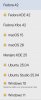
I have all my VMs on an external Thunderbolt4/USB4 SSD (on a 15" M3 MacBook Air, with Parallels Desktop Pro 20.4.0 and macOS Sequoia 15.5); some of them, I originally created on the Mac's internal SSD (and then moved), others I subsequently created directly on the external drive: now, the first ones, which were moved from the internal to the external drive, correctly have the clickable orange disk badge that makes clear that they are on an external drive; while those created directly on the external drive strangely have no badges (as if they were on an internal drive): so, how do I get the badges also on the newly created VMs (or, alternatively, remove the badges from the "old" ones)...? Of course, I would like all the VMs in the Control Centre to behave the same, as they are all on the same external drive. Thanks...