
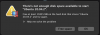
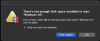
I have two VMs, neither one will start
First one is configured as 256 GB disk, second one is configured as a 150 GB disk.
Machine has 732 GB of free space.
I've run disk first aid on the mac and I''ve rebooted. I had about 500 GB when the problem first happened, I freed up another 200+ GB and it's still happening.
iMac Pro with 2TB drive.
First one is configured as 256 GB disk, second one is configured as a 150 GB disk.
Machine has 732 GB of free space.
I've run disk first aid on the mac and I''ve rebooted. I had about 500 GB when the problem first happened, I freed up another 200+ GB and it's still happening.
iMac Pro with 2TB drive.

