
Hi team,
I'm experiencing a weird colour (or brightness) difference when switching between the Mac side and Parallels desktop in full screen running windows 10.
I've never experienced this before and have recently updated my Parallels installation to the latest minor version of Parallels Desktop 11.
It seems like the entire Parallels machine is "selected" and is blue because it's selected, like when you select text in a text editor on a mac.
I've tried to screenshot the difference, but it doesn't work unfortunately.
Does anybody else have this issue or have any ideas as to why this might be happening?
Thanks in advance for any help.
Cheers,
Josh
I'm experiencing a weird colour (or brightness) difference when switching between the Mac side and Parallels desktop in full screen running windows 10.
I've never experienced this before and have recently updated my Parallels installation to the latest minor version of Parallels Desktop 11.
It seems like the entire Parallels machine is "selected" and is blue because it's selected, like when you select text in a text editor on a mac.
I've tried to screenshot the difference, but it doesn't work unfortunately.
Does anybody else have this issue or have any ideas as to why this might be happening?
Thanks in advance for any help.
Cheers,
Josh
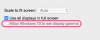


 , currently using "Parallels 13" and found it as Jamie in "Configure > Options/Full Screen > Advanced Settings"
