Hi
@ParallelsU191
This entries in the log means that your environment is being under attack on port which is utilized by RAS Gateway. First of all please don't worry as there are actually no succesful connections to your terminal servers. This entry means that there is a successful connection on RAS Gateway port. Such attacks are mostly targeted not to compromise the environment, but disrupt the gateway performance instead.
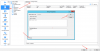
In order to prevent RAS Gateway from listening for native RDP connections established over RAS Gateway port I would recommend to disable Tunneling Policies feature that is designed to balance native RDP connections if those are established specifically over gateway port.
To do so please open
Remote Application Server Console and navigate to
Farm -
Gateways - Switch to
Tunneling Policies tab - Right-click
<Default> policy and select
Properties - In opened window select
None option in the bottom of the window - then click
OK - after window will close click
Apply button in bottom left corner of RAS Console to commit chnges. (please refer to attached screenshot for reference)
With this setting set RAS Gateway will not interfere with standard RDP connections that were established over Gateway port. However please note: this will only prevent RAS Gateway from accepting incoming RDP connections established over Gateway port, but it will not prevent attempts to compromise the environment so please consider advanced security measures.
Let me know should you have any questions or would like to discuss something.