
Install the app
How to install the app on iOS
Follow along with the video below to see how to install our site as a web app on your home screen.
Note: This feature may not be available in some browsers.
You are using an out of date browser. It may not display this or other websites correctly.
You should upgrade or use an alternative browser.
You should upgrade or use an alternative browser.
When I right-click on a file, windows apps don't appear in "open with"
- Thread starter Parsaua
- Start date

Hi Parsaua, please follow the steps mentioned below:
1. In order to change file associations with SmartSelect on the Mac side, please locate any file with appropriate extension and choose Get Info option:
2.Under Open With section click on drop down menu:
3.Choose Windows application if it is listed. If it is not listed - click "Other":
4.On the opened window, in the dropdown menu choose Macintosh HD -> then Users -> your user name -> Applications (Parallels) folder, and open the appropriate virtual machine folder
5.Check Always Open With checkbox
6.Choose the appropiate Windows program to open this file type from the list (Microsoft Word)
7.At the end click Change All... option in Get Info window and close the dialog.
1. In order to change file associations with SmartSelect on the Mac side, please locate any file with appropriate extension and choose Get Info option:
2.Under Open With section click on drop down menu:
3.Choose Windows application if it is listed. If it is not listed - click "Other":
4.On the opened window, in the dropdown menu choose Macintosh HD -> then Users -> your user name -> Applications (Parallels) folder, and open the appropriate virtual machine folder
5.Check Always Open With checkbox
6.Choose the appropiate Windows program to open this file type from the list (Microsoft Word)
7.At the end click Change All... option in Get Info window and close the dialog.
Here's the problem :Hi Parsaua, please follow the steps mentioned below:
1. In order to change file associations with SmartSelect on the Mac side, please locate any file with appropriate extension and choose Get Info option:
2.Under Open With section click on drop down menu:
3.Choose Windows application if it is listed. If it is not listed - click "Other":
4.On the opened window, in the dropdown menu choose Macintosh HD -> then Users -> your user name -> Applications (Parallels) folder, and open the appropriate virtual machine folder
5.Check Always Open With checkbox
6.Choose the appropiate Windows program to open this file type from the list (Microsoft Word)
7.At the end click Change All... option in Get Info window and close the dialog.
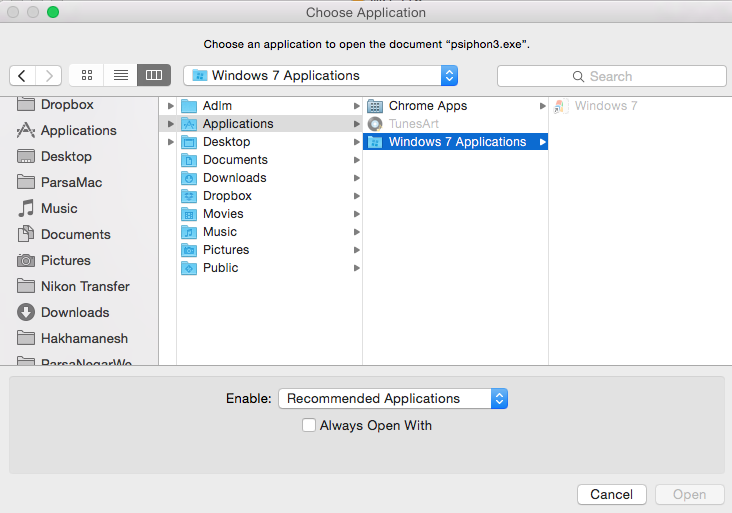
I just need to be able to open programs like this :
http://www.blogcdn.com/www.engadget.com/media/2013/08/parallelsmac9-1377813471.jpg
but paralles starts like this and I cant get it to open like the one above :

http://www.blogcdn.com/www.engadget.com/media/2013/08/parallelsmac9-1377813471.jpg
but paralles starts like this and I cant get it to open like the one above :
Stephen_Patton
Bit poster
Did you ever get a solution. Mine stopped working a while ago as well.
Hello Stephen_Patton, could you please share a screenshot of the error message, so that we could check and help!Did you ever get a solution. Mine stopped working a while ago as well.