
rcgarcelon
Bit poster
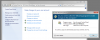
The only account showing on my Win-7 login screen is the one created when I installed windows. When I startup the VM, I type its password to login, and everything runs fine. But when I want to change certain settings in the control panels, I am told by the dialog box: "To continue, type an administrator password, and then click Yes".
Well, there is NO field in which to type anything much less a password, and the Yes button is grayed out. Help!
Also, the account is of type Guest, password protected, which is fine for everyday use, but I would sometimes like to log in as administrator or change my account from Guest to Administrator. Is the default admin account hidden, and if so how do I show it?
I'm running:
Win-7 Home Premium SP1, all updates current
Parallels Desktop Mac Build 9.0.23350 (Revision 941886; Monday, November 11, 2013)
iMac quad-core i7, 12GB RAM; 2 cores + 6GB assigned to VM
Well, there is NO field in which to type anything much less a password, and the Yes button is grayed out. Help!
Also, the account is of type Guest, password protected, which is fine for everyday use, but I would sometimes like to log in as administrator or change my account from Guest to Administrator. Is the default admin account hidden, and if so how do I show it?
I'm running:
Win-7 Home Premium SP1, all updates current
Parallels Desktop Mac Build 9.0.23350 (Revision 941886; Monday, November 11, 2013)
iMac quad-core i7, 12GB RAM; 2 cores + 6GB assigned to VM